You've put serious thought into your menu, your interiors, and your team. But if guests can still only book a table by calling you during service — or by just walking in and hoping for the best — you're leaving real money on the table. And losing real guests to competitors who make it easier to book.
An online table reservation system isn't a luxury for fine-dining establishments anymore. It's becoming table stakes for any restaurant, bar, or dining venue that wants to fill seats consistently, reduce operational chaos, and build a loyal guest base. Here's a thorough look at what it is, why it matters, and what to look for.
What Is an Online Table Reservation System?
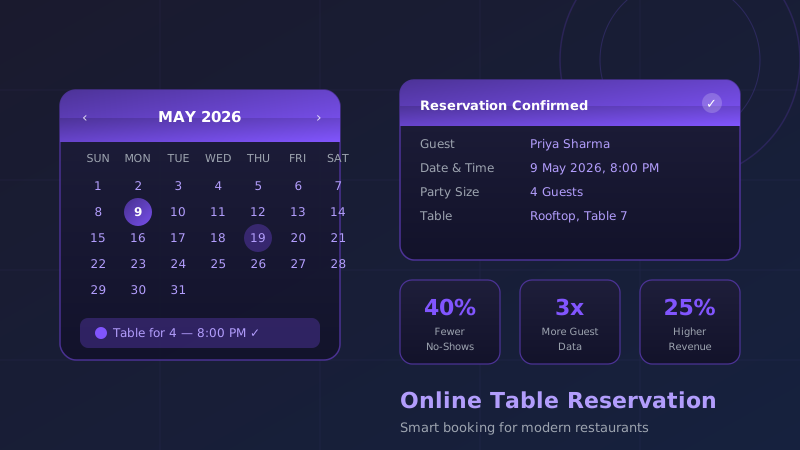
An online reservation system lets guests book a table at your restaurant directly — through your website, a booking link you share on Instagram, Google, or WhatsApp, or a dedicated booking page. Guests select the date, time, party size, and optionally provide preferences or special requests. They receive a confirmation (SMS or email), and you see the booking instantly in your dashboard.
On the backend, a good system handles table allocation logic, time-slot management, waitlist queues, capacity controls, and automated reminders. The best ones also capture structured guest data and connect with your POS and CRM.
Walk-Ins vs. Reservations: A Realistic Comparison
Many restaurant owners, especially in India, operate almost entirely on walk-ins. It works — until it doesn't. Here's how the two models stack up:
| Factor | Walk-Ins Only | With Reservation System |
|---|---|---|
| Peak night predictability | Unknown until guests arrive | Known 24–72 hrs in advance |
| Staff preparation | Reactive; often under/over-staffed | Proactive; scheduled to demand |
| No-show risk | Low (no commitment) | Manageable with deposits & reminders |
| Guest data capture | Minimal | Name, contact, occasion, preferences |
| Special occasion awareness | Discovered at the table, too late | Known in advance; can be celebrated |
| Upselling opportunity | At the table only | Pre-arrival (pre-orders, packages) |
| Marketing database | Not built | Grows with every booking |
This doesn't mean walk-ins are bad — most venues run a healthy mix. The point is that reservations give you information and leverage that walk-ins never can.
7 Key Benefits of an Online Reservation System
1. Reduce No-Shows with Deposits and Reminders
No-shows are the silent killer of restaurant profitability. A table held all evening for a party that never arrives is revenue that simply disappears. Online reservation systems tackle this with two tools: automated reminders (SMS or WhatsApp the morning of and 2 hours before) and the option to collect a partial deposit at booking. Even a Rs 200 per-head deposit is enough to change guest behaviour significantly — industry data consistently shows 40–60% fewer no-shows when deposits are collected.
2. Build a Structured Guest Database
Every reservation captures what a walk-in never can: the guest's name, contact number, party size, visit frequency, special occasions, dietary restrictions, and preferences. Over time, this database is one of your most valuable business assets. You can send personalised birthday offers, re-engage lapsed guests, and build segments for targeted WhatsApp campaigns — all from data that was being thrown away before.
3. Plan Peak Periods with Precision
When Friday night reservations start filling up by Wednesday, you know to call in an extra server and prep additional inventory. You can also stagger booking times to avoid bunching — spreading covers across 7 PM, 7:30 PM, and 8 PM slots instead of everyone arriving at once, reducing kitchen pressure and wait times significantly.
4. Give Your Team Time to Prepare
Knowing in advance that Table 8 is celebrating an anniversary, that the Mehta party of 6 has one vegan, and that the first booking is arriving at 6:45 PM — that's the kind of intelligence that transforms good service into memorable service. Your host, kitchen, and floor team can all show up prepared rather than scrambling to react.
5. Unlock Pre-Arrival Upselling
A reservation confirmation email can include a link to pre-order a bottle of wine, add a cake for the birthday table, or book a curated tasting menu at a special price. These pre-orders don't just boost revenue — they also reduce last-minute chaos, since the kitchen knows exactly what's coming before the doors open.
6. Automate Your Review and Feedback Loop
Most reservation platforms allow you to send a post-dining feedback link or a Google review request automatically, 30–60 minutes after the booking's expected end time. This single automation can meaningfully improve your online rating over months, which in turn drives more organic bookings. The timing is key — catching guests when the experience is fresh.
7. Drive Repeat Visits with Targeted Re-Engagement
With a guest database, you can identify guests who haven't visited in 60 or 90 days and send them a personalised "We miss you" offer. You can invite high-frequency guests to exclusive preview dinners. You can wish returning guests a happy birthday with a complimentary dessert offer. None of this is possible without the structured data a reservation system creates.
How a Reservation System Integrates with Your POS
A reservation system working in isolation is useful. One connected to your POS is genuinely powerful. The integration unlocks a few specific capabilities:
- Real-time table status — The floor map updates automatically as tables are seated, dining, and cleared, so reservations never collide with lingering covers.
- Spend per cover tracking — Match reservation data with POS spend to understand which booking channels and guest segments are your most valuable.
- Pre-order fulfilment — Items pre-ordered at booking time automatically appear as a KOT (Kitchen Order Ticket) when the table is seated, with no manual input required.
- Loyalty trigger — Recognise returning guests automatically when they check in, and trigger loyalty rewards or personalised greetings through your CRM.
Features Checklist: What to Look for in a Reservation System
Not all systems are equal. When evaluating vendors, run through this checklist:
- Custom booking page (branded to your restaurant, not the vendor's marketplace)
- Automated SMS/WhatsApp/email confirmations and reminders
- Deposit collection with payment gateway integration
- Visual floor map and table management
- Waitlist management for walk-ins on busy nights
- Guest profiles with visit history and notes
- Pre-order and add-on capability
- POS and CRM integration
- Post-dining feedback automation
- Analytics dashboard (covers by day, time, channel)
- Mobile app for managers on the floor
- Two-way WhatsApp communication
Questions to Ask Vendors Before You Sign Up
Choosing the wrong system means data lock-in, poor support, and a painful switch later. Ask these before committing:
- Do you own the guest data, or does the vendor? Some marketplace-style platforms share your guest data with competitors. Ensure your data stays yours.
- What happens if a guest cancels — is the deposit refund process automated?
- Is there a per-cover fee? Some global platforms charge per booking and costs can add up fast at volume.
- Does it work offline? If your internet drops on a Saturday night, the host stand cannot freeze.
- What does the onboarding process look like, and how long does setup take?
- Can you integrate with your existing POS? Ask for a specific integration list, not just "yes, we integrate."
Tip: Ask for a reference from a similar-format restaurant in your city. A system that works well for a 40-cover fine-dining room may not suit a 200-cover casual dining venue at all.
Where ZillOut Fits In
If you're looking for a reservation system that's built specifically for the Indian venue market — and one that connects reservations with your POS, digital menu, guest database, and WhatsApp marketing in a single platform — ZillOut is worth a look. Venues using ZillOut typically go live in under three days, and the system is designed around the real operational realities of Indian restaurants: variable covers, WhatsApp-first guest communication, GST compliance, and multi-payment flexibility.
Rather than stitching together five separate tools (a booking platform, a POS, a CRM, a marketing tool, and a review manager), ZillOut brings it together so your team manages everything from one dashboard.
Final Thoughts
An online table reservation system is one of the highest-ROI investments a restaurant can make. The upfront effort of setting it up — configuring your floor map, building your booking page, training your host team — pays back quickly in reduced no-shows, better-prepared service, and a growing guest database that fuels repeat business.
Start with the basics: a booking link, automated reminders, and deposit collection. Add layers — pre-orders, post-dining feedback, CRM segments — as your team gets comfortable. Within a few months, the way you run a busy Friday night will look fundamentally different.